OpenIM Stress & Reliability Testing
Terminology & Scope
- OpenIMSDK: General term, including OpenIMClientSDK (client SDK) and OpenIMServer (server).
- ChatServer: Refers to the message-related modules of OpenIMServer in this document.
- App Administrator: Administrator account used for management-side API calls (e.g., obtaining tokens, batch operations).
- App Business Server: The business backend integrating with OpenIMServer (handles your business logic, integrated with the IM system via API/callback/SDK).
Background
OpenIM is not a standalone chat application (like WeChat or Slack), but rather an instant messaging solution providing OpenIMClientSDK and OpenIMServer. Since OpenIMClientSDK's underlying implementation relies on Go-based openim-sdk-core, without massive real-world endpoints, stress testing programs are needed to simulate large-scale user online presence and message traffic to evaluate system capacity, reliability, and latency.
This test uses two test programs in coordination:
-
Test Program A: openim-sdk-core/integration_test (for reliability/latency and consistency verification)
- Loads and runs
openim-sdk-coreinstances to simulate OpenIMClientSDK instances, covering a comprehensive client pipeline.
- Loads and runs
-
Test Program B: openim-sdk-core/msgtest (for stress/capacity)
- Focuses on login and message sending/receiving, used to launch large numbers of instances simulating high-concurrency stress scenarios.
Recommended approach: msgtest generates the stress load; integration_test performs sampling verification for reliability and latency.
Reliability & Latency Definitions
- Reliability: Message delivery reliability ("guaranteed delivery") — messages sent must be received by the recipient.
- Latency: Time elapsed from Client A creating and sending a message to Client B successfully receiving and persisting it.
Test Resources
Server 1: Ubuntu 22.04.2, 16 Core, 64GB RAM, 150GB HDD: Deploys components and OpenIMServer; also deploys Test Program B; may deploy Test Program A in shared memory /dev/shm.
Server 2: Ubuntu 18.04.5, 4 Core, 8GB RAM, 40GB HDD: Deploys Test Program A in shared memory /dev/shm.
Server config open-im-server/start-config.yml: Service instances adjusted to openim-push: 8, openim-msgtransfer: 8, others remain at 1.
Test Scenarios & Results
Test 1: 200 Users
Test Program A simulates 200 users, with 100 logging in immediately, sending messages to small groups and friends.
Command:
go run main.go -lgr 0.5 -imf -crg -ckgn -ckcon -sem -ckmsn -u 200 -su 10 -lg 2 -cg 2 -cgm 5 -sm 5 -gm 5 -reg
Deployment: Test Program A deployed on Server 1's shared memory /dev/shm.
| Parameter/Result | Description |
|---|---|
| Test Purpose | Test message reliability and latency with a small number of users |
| User Count | 200 users, 100 log in immediately, 100 delayed login |
| Group Count & Size | Each user joins 0-10 regular groups with 5 members |
| Message Rate | Peak 40 msg/s |
| Total Messages | 112,350 |
| Message Integrity | 100% (all messages delivered accurately) |
| Average Latency | 0.231 seconds |
| Maximum Latency | 1.703 seconds |
Test 2: 50K Online Users + Small Groups
- Test Program B: Simulates 50,000 online users sending messages randomly (generating stress).
- Test Program A: Simulates 100 users (sampling reliability and latency statistics).
Commands (examples):
- Test Program A registers 100K users:
go run main.go -reg -u 100000 - Test Program B starts 50K online users:
go run main.go -s 49500 -e 99500 -c 100 -i 500 -rs 1000 -rr 1000 - Test Program A sampling:
go run main.go -lgr 0.8 -imf -crg -ckgn -ckcon -sem -ckmsn -u 100 -su 3 -lg 0 -cg 4 -cgm 5 -sm 100 -gm 100 -msgitv 1500 -test
Deployment: Test Program A on Server 2's /dev/shm, Test Program B on Server 1.
| Parameter/Result | Description |
|---|---|
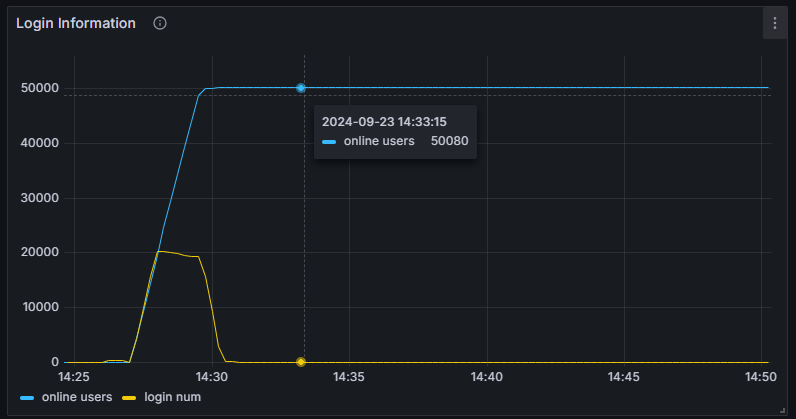
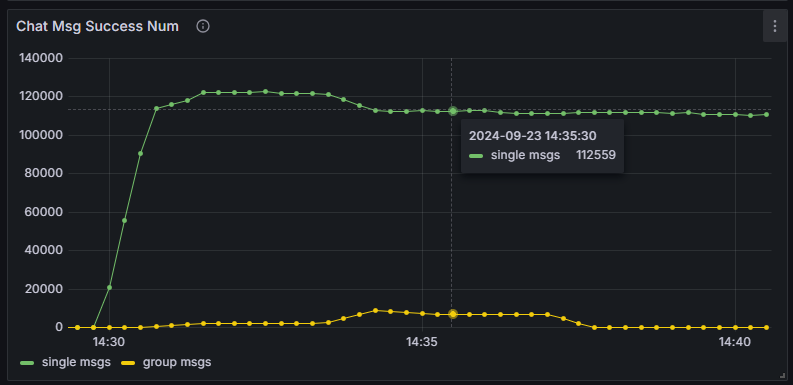
| Stress Load | 50,000 users online, ~1,700 messages/second |
| Sampling User Count | 100 users, 80 log in immediately, 20 delayed login |
| Sampling Group Count & Size | Each user joins 0-20 regular groups with 5 members |
| Sampling Message Send Rate | Peak 54 msg/s |
| Sampling Message Count | 170,800 |
| Sampling Message Integrity | 100% (all messages delivered accurately) |
| Sampling Average Latency | 0.202 seconds |
| Sampling Maximum Latency | 3.641 seconds |
Test 2: Server Resource Consumption
Online users:
Message pressure (metric below indicates messages received by the server per minute):
CPU usage:
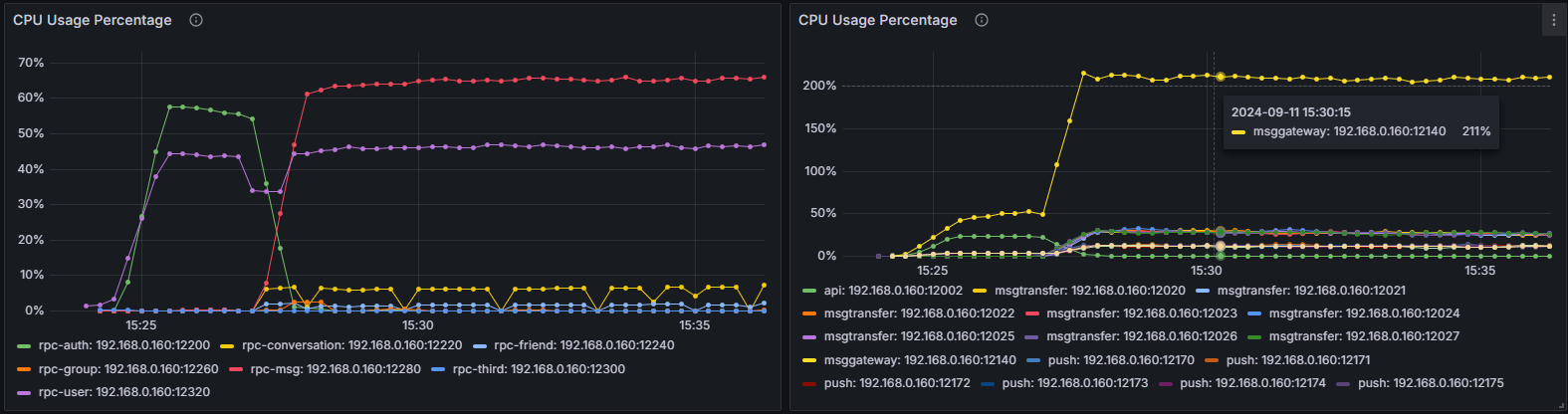
| Process | CPU Usage |
|---|---|
| openim-msggateway | 210% |
| mongo | 100% |
| kafka | 84% |
| redis | 67% |
| openim-rpc-msg | 56% |
| openim-msgtransfer | 27%*8 |
| openim-push | 13%*8 |
| Other OpenIM services and components | 65% |
| Total | 902% |
Physical memory usage:
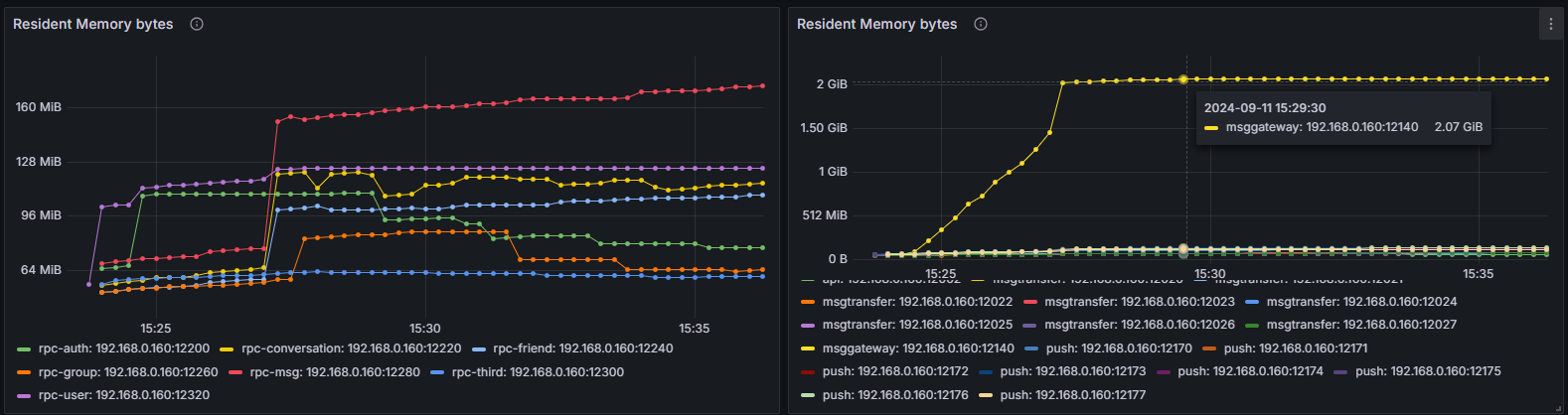
| Process | Memory Usage |
|---|---|
| openim-msggateway | 2.1 GiB |
| mongo | 717 MiB |
| kafka | 1.1 GiB |
| redis | 85 MiB |
| openim-rpc-msg | 162 MiB |
| openim-msgtransfer | 74 MiB*8 |
| openim-push | 126 MiB*8 |
| Other OpenIM services and components | 457 MiB |
| Total (all OpenIM services and components) | 6.986 GiB |
Note: The above table is an approximate summary and does not include Docker's overhead for forwarding data to containers.
Test 3: 100K-Member Large Group (Commercial OpenIM)
The following data is from commercial OpenIM testing.
Code Modifications
To support super-large group creation/online scenarios, adaptive modifications to the test programs are needed:
-
Test Program A:
internal/group/notification.go- Search for
case constant.MemberInvitedNotification:and comment out thatcaseblock.
- Search for
-
Test Program A:
internal/group/group.go- Search for
syncer.WithNotice[*model_struct.LocalGroupMember, group.GetGroupMemberListResp, and comment out thecase syncer.Insertblock in theswitch statebelow.
- Search for
-
Test Program B:
internal/interaction/long_conn_mgr.go- Add
return nilat the beginning of thehandleMessagemethod.
- Add
Test Resources & Deployment
5 servers with 64 cores and 128GB RAM: 4 deploy Test Program B, 1 deploys the server; additionally 1 server with 16 cores and 32GB RAM deploys Test Program A. All connected via internal network.
Execution
- Test Program B: Simulates 100K online users, sending minimal messages.
- Test Program A: Simulates 20 users, all logging in immediately, sending messages to 1 large group with 100K members and to friends.
- Test Program A registers 200K users:
go run main.go -reg -u 200000
- Test Program A creates 1 large group (110K members):
go run main.go -lgr 1 -imf -crg -ckgn -ckcon -u 20 -su 1 -lg 1 -cg 0 -lgm 110000 -msgitv 40 -gm 5000 -sm 0
- After group creation, each of the 4 Test Program B servers starts 25K online users:
go run main.go -o 25000 -s 11 -e 25011 -c 1000 -i 500000 -rs 1000 -rr 1000go run main.go -o 25000 -s 25011 -e 50011 -c 1000 -i 500000 -rs 1000 -rr 1000go run main.go -o 25000 -s 50011 -e 75011 -c 1000 -i 500000 -rs 1000 -rr 1000go run main.go -o 25000 -s 75011 -e 100011 -c 1000 -i 500000 -rs 1000 -rr 1000
- After confirming 100K users are logged in, start Test Program A for message sending and verification:
go run main.go -lgr 1 -sem -ckmsn -u 20 -su 1 -lg 1 -cg 0 -lgm 110000 -msgitv 40 -gm 5000 -sm 0
Test Program A deployed in server shared memory /dev/shm.
Results
| Parameter/Result | Description |
|---|---|
| Stress Load | 100,000 users online, ~200 messages/second, push delivery rate of ~20M messages/second |
| Sampling User Count | 20 users, all log in immediately |
| Sampling Group Count & Size | 1 large group with 110,000 members, 10,010 online |
| Sampling Message Send Rate | Peak 200 msg/s |
| Sampling Message Count | ~1.9M |
| Sampling Message Integrity | 100% (all messages delivered accurately) |
| Sampling Average Latency | 0.805 seconds |
| Sampling Maximum Latency | 3.772 seconds |
Resource Consumption
Peak server-side resource consumption in this scenario:
- CPU: 48.81% (~31+ cores)
- Memory: 11.06% (~14.15 GB)
- Outbound bandwidth: 11.158 Gbit/s
- Inbound bandwidth: 252.372 Mbit/s
Test Program B server peak resource consumption:
- CPU: 38.01% (~24+ cores)
Results Analysis
OpenIM supports 50K concurrent online users. Under a stress load of 1,700 messages per second, message delivery rate reaches 100%. Average message latency is below 1 second, and maximum latency does not exceed 3 seconds.
Configuration Recommendations
Based on 100K registered users, 10% daily online rate, support for 50K-member large groups, and 600 messages per second, recommended configuration:
| Resource | Configuration |
|---|---|
| Memory | 16 GB |
| CPU | 8 Cores |
| Network Bandwidth | 10 Mbps |
Note: Message packet size is calculated at 2 KB; actual size varies with message content. Typical text message packets are approximately 700 bytes.