How to Integrate with Your Existing System
Instant messaging (IM) has become a critical part of internet infrastructure and an essential feature in many applications. If you have developed an application and wish to integrate OpenIMSDK for chat functionality, this document provides a brief overview of the integration steps.
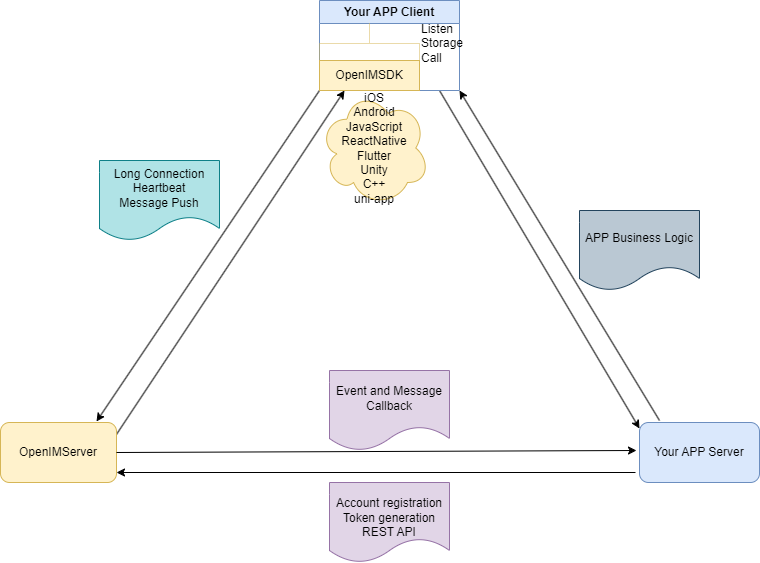
In the system diagram above:
- Your APP Server represents your existing application's server-side. The development language is unrestricted. User information (including profiles and password verification) is stored on this server.
- Your APP Client represents your existing application's client-side. All mainstream development frameworks are supported.
Your APP Server Calls REST API to Interface with IM Server
- New User Registration: After a user registers successfully, call the User Registration API.
- User Info Update: After a user updates their info (e.g., avatar, nickname, extension fields), call the Update User Info API.
- Get IM Token: After password verification, call the Get User IM Token API and return the IM Token to Your APP Client.
- Import Existing Users: Before launch, call the User Registration API to import existing user data.
Your APP Client Integrates OpenIM SDK
- User Login: After successful login, obtain the IM Token from Your APP Server and call the IM SDK Login API.
- Embed IMSDK: Embed the IMSDK into your application to integrate chat functionality.
- User Info Management: Use your existing Your APP Server APIs for retrieving and updating user info.